
Mac + iPhone
Notes apps for Mac and iPhone: which fits your day?
Start with Apple Notes if you want a free way to use the same notes on Mac and iPhone. For a Mac panel that opens from the screen edge, compare SideNotes and Flyout. UpNote also covers Windows and Android, while Drafts is useful when the next step is sending text to another app.
Mac and iPhone at a glance
| App | Best fit | Sync and platforms | Mac + iPhone cost |
|---|---|---|---|
| Apple Notes | Free notes, checklists and collaboration | iCloud; Mac, iPhone and iPad | Free app; iCloud storage limits apply |
| SideNotes | Screen-edge capture with a separate mobile purchase | iCloud; Mac, iPhone and iPad | $19.99 Mac + $9.99 mobile = $29.98 once for current major versions |
| Flyout | Notes and task statuses beside your Mac work | Optional iCloud; Mac, iPhone and iPad | $24 once here; Mac + iPhone + iPad, five devices total |
| UpNote | A notebook library across Apple and other devices | UpNote account; Mac, iPhone, iPad, Windows, Android and Linux | Free up to 50 notes; Premium $1.99/month or $39.99 lifetime |
| Drafts | Capture text, then act on it | iCloud; Mac, iPhone, iPad and Apple Watch | Free creation and sync; optional Pro $19.99/year or $1.99/month |
Checked on 6 September 2026 against the official sources linked in each profile. Flyout’s price, device support and local agent access were checked on 5 October 2026. Prices are the published USD prices; region and tax can change the checkout total. SideNotes’ $29.98 total is the sum of its two listed purchases. We make Flyout; it is marked as our app.
The important questions are separate: how quickly can you capture a note on Mac, what can you do with it on your phone, and does one purchase cover both? An iPhone app does not automatically mean an iPad app, and a Mac purchase does not always include mobile.
Apple NotesFree app; iCloud storage limits apply
Free notes, checklists and collaboration
Apple Notes is a useful first test because it is already on your devices. Turn on Notes in iCloud on Mac and iPhone to use the same library. Checklists, images and shared notes cover many everyday jobs. On Mac, Fn-Q opens a Quick Note. Choose it if your main requirement is having a shopping list or reference note available on both devices.
Apple: iCloud Notes setup · Apple: Quick Note on Mac · Apple: Notes features
Pros
- No separate app purchase for either device
- Checklists, attachments and shared notes
Cons
- iCloud storage is shared with your other iCloud data
- Quick Note opens from a shortcut or corner, rather than a full screen edge
SideNotes$19.99 Mac + $9.99 mobile = $29.98 once for current major versions
Screen-edge capture with a separate mobile purchase
SideNotes opens at the Mac screen edge and has a separate mobile app for iPhone and iPad. Both use iCloud. Its themes, checklists and Mac automation options make it a close alternative to Flyout. The Mac and mobile apps are separate purchases. The mobile app does not include the Mac app’s file shortcuts or backups, so check which parts of your workflow need to travel.
SideNotes: Mac features and price · SideNotes Mobile: price and differences
Pros
- Screen-edge notes on Mac; iPhone and iPad companion
- Themes and checklists
Cons
- Mobile costs extra
- Mac file shortcuts and backups are absent from mobile
Flyout$24 once here; Mac + iPhone + iPad, five devices totalOur app
Notes and task statuses beside your Mac work
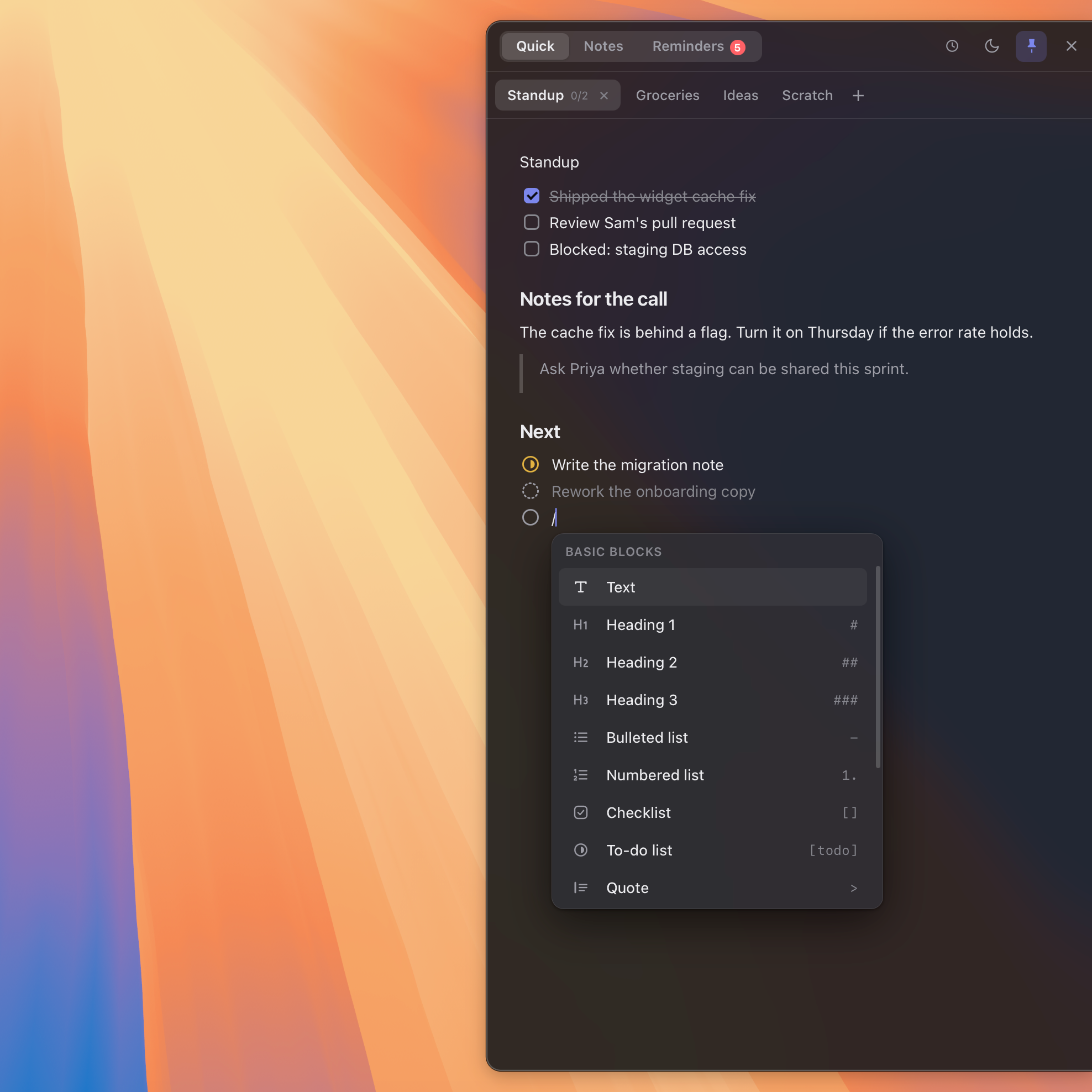
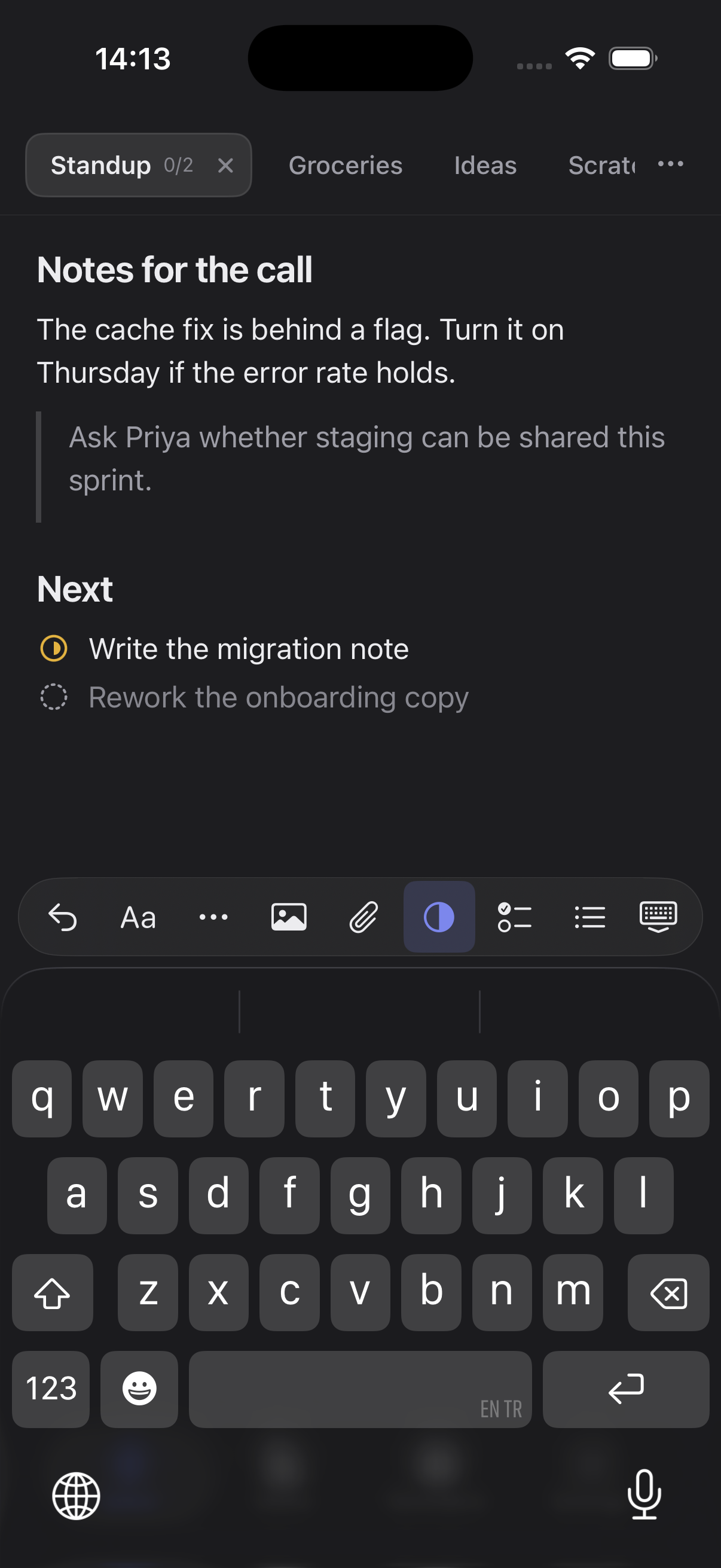
Flyout is our app. Open the Mac panel from the screen edge, menu bar or hotkey; keep code, images, reminders and tasks with custom statuses in a note. The same web license includes iPhone and iPad access. To sync, enable iCloud in both apps using the same Apple account. The mobile app also has task statuses, app themes and 38 note colours. Mac requires macOS 14 or later, and the mobile app requires iOS 18 or iPadOS 18 or later, with a native iPad layout. On Mac, you can pair Codex, Claude Code or Claude Desktop with Flyout, allow the whole library or only selected folders, and grant permissions for searching, reading, creating notes or setting reminders. Encrypted notes are excluded. Deletions require approval in Flyout. Agent access is off by default, and note content you let an agent read may be sent to its AI provider. Flyout has no built-in AI generation or voice capture.
Flyout: license and sync help · Flyout for Mobile
Pros
- One web license for Mac, iPhone and iPad
- Custom task statuses and reminders within notes
- Local writing with optional iCloud sync
Cons
- No Windows or Android app
- Sync must be enabled on both devices
For macOS 14 Sonoma and later. iPhone and iPad app included. No account, no subscription.
UpNoteFree up to 50 notes; Premium $1.99/month or $39.99 lifetime
A notebook library across Apple and other devices
UpNote is worth considering if your next device might be a Windows laptop or Android phone. An UpNote account syncs notes and Premium access across platforms. It organises notes in nested notebooks and supports offline editing. The free version allows 50 notes; Premium adds unlimited notes and advanced features. It is a broader notebook library rather than a screen-edge panel.
Pros
- One Premium purchase works across supported platforms
- Free sync and offline editing
Cons
- Free version limited to 50 notes
- Uses an UpNote account rather than your iCloud account
DraftsFree creation and sync; optional Pro $19.99/year or $1.99/month
Capture text, then act on it
Drafts fits text that will become a message, task or input to another tool. Creating, editing and syncing drafts is free. Pro adds action editing, workspaces, custom themes and other features; one subscription covers the supported Apple platforms. Its task support includes checkboxes and three-state lists. Choose it when text actions matter more than keeping images and attachments inside a rich note.
Drafts: free features and Pro pricing · Drafts: tasks
Pros
- Free note creation, editing and sync
- Text actions and several task-list formats
Cons
- Advanced customisation requires a subscription
- The editor is centred on text
Open the same note on Mac and iPhone
The license unlocks the app; iCloud sync is a separate setting and starts off.
- Use the same Apple Account for iCloud on both devices. Install Flyout on your Mac and the Flyout iPhone app.
- Turn on iCloud sync in Flyout’s settings on each device. If the app asks to restart, restart it.
- Create a short test note on one device, then check the library on the other. Allow the first sync to finish before editing the same note on both devices.
If the note has not arrived, check the sync status and connection on both devices. Do not delete the source note or reinstall to force a sync. Your local version histories are separate and do not sync.
Choose around the note you actually need
A shared household list
Start with Apple Notes. Sharing a checklist is a different requirement from syncing your own private library. Flyout does not offer shared notebooks or team task assignment.
A task beside your Mac, then a check on your phone
Try Flyout with one note containing instructions and a task marked in progress. Open it on iPhone after enabling iCloud on both devices. Judge the whole routine, including returning to the Mac, before buying.
An iPad is part of the plan
Compare Apple Notes, SideNotes, UpNote and Drafts. Flyout also has a native iPad layout, included in the same web license.
A Windows or Android device may join later
UpNote has native apps on those platforms. Do not buy an Apple-only tool expecting an unannounced platform version to arrive.
Questions people ask
- What is a free notes app for Mac and iPhone?
- Apple Notes is included on both devices. Drafts lets you create, edit and sync notes for free. UpNote also has free sync, with a 50-note limit. Their paid options and editing workflows differ.
- Does one purchase include both the Mac and iPhone apps?
- It depends on the product. A Flyout license bought on this website includes both apps. UpNote Premium follows your UpNote account. SideNotes sells Mac and mobile separately; Drafts offers a cross-platform Pro subscription.
- Does Flyout sync automatically after installation?
- Sync is off by default. Enable iCloud sync in both Flyout apps and use the same Apple account. You can write locally without enabling sync.
- Can I use Flyout on iPad?
- Yes. The mobile app includes a native iPad layout on iPadOS 18 or later, covered by the same web license. The table shows how the other apps compare.
Try one note across Mac and iPhone
Start the Mac trial, add a task and open the same note on your iPhone with iCloud enabled. If the routine fits, the web license includes both apps.
For macOS 14 Sonoma and later. iPhone and iPad app included. No account, no subscription.
Prefer a one-to-one comparison? All comparisons